Dubai visa photo requirements 2027 – size, background & specs (Complete Guide)
The Dubai visa photo requirements 2026 – size, background & specs are strict and digitally verified by UAE immigration systems. A small mistake—like wrong size, poor lighting, or incorrect background—can lead to instant rejection. UAE authorities use biometric verification, so your photo must meet precise ICAO and ICP standards.
In this complete guide, you’ll learn everything: correct photo size, digital specs, background rules, lighting, common mistakes, and how to take a perfect visa photo at home.
Dubai Visa Photo Requirements 2026 – Quick Answers
If you're looking for quick answers about Dubai visa photo rules, this section provides clear, concise information optimized for fast understanding and search visibility.
What is the required photo size for Dubai visa?
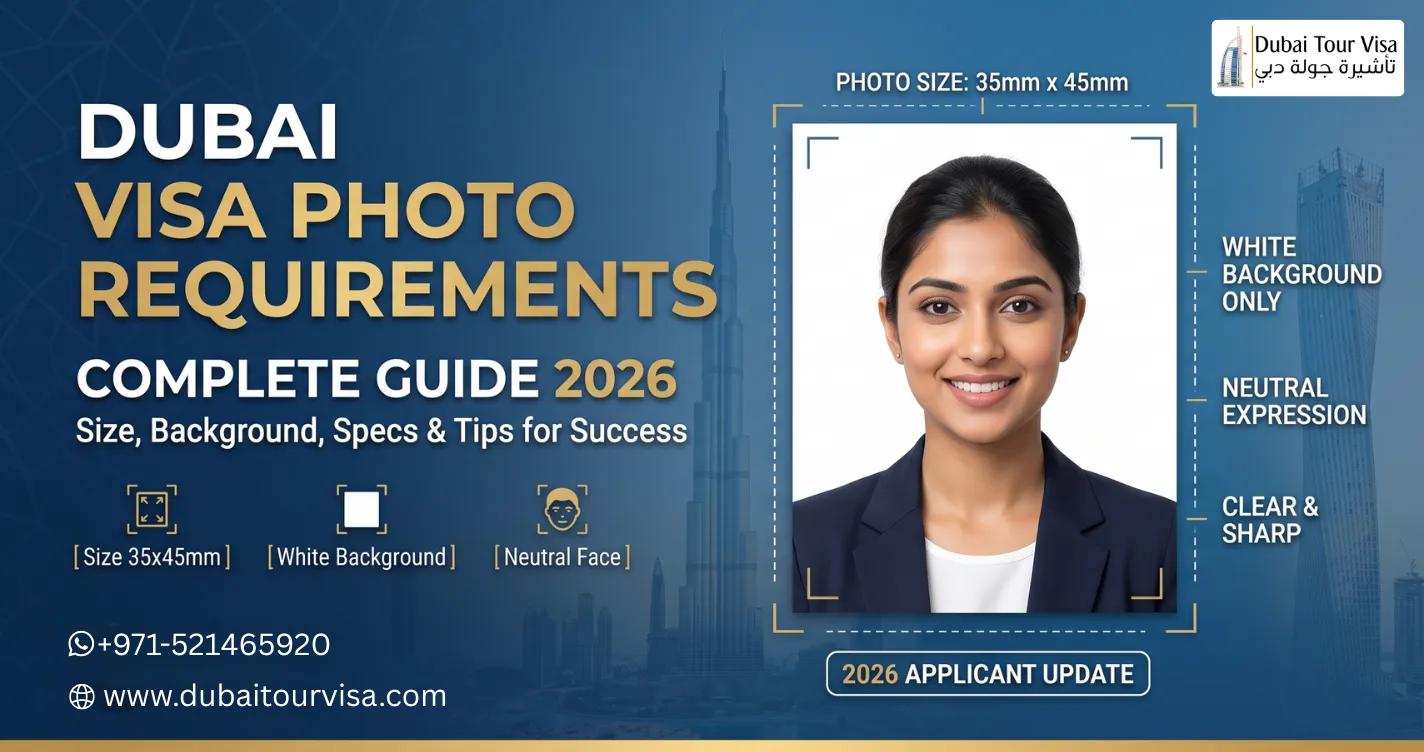
The standard Dubai visa photo size is 35mm × 45mm. In some cases, 43mm × 55mm is also accepted depending on the visa application system.
What background is required for Dubai visa photo?
The background must be plain white with no shadows, patterns, or objects. A clean and evenly lit background is mandatory.
What are the key photo specifications?
- Format: JPEG/JPG
- File Size: 100 KB – 600 KB
- Resolution: Minimum 300 DPI
- Recent photo: Taken within last 6 months
Can I take a Dubai visa photo at home?
Yes, you can take it at home using a smartphone, as long as you follow proper lighting, white background, correct framing, and ICAO guidelines.
Are glasses allowed in Dubai visa photos?
No, glasses are not allowed unless medically necessary. Eyes must be clearly visible without reflections or obstruction.
Quick Requirements Summary Table
| Requirement | Details |
|---|---|
| Photo Size | 35mm × 45mm |
| Background | Plain White |
| Format | JPEG/JPG |
| File Size | 100 KB – 600 KB |
| Expression | Neutral (no smile) |
| Photo Age | Less than 6 months |
This quick-answer section helps you understand the most important Dubai visa photo requirements instantly, making your application process faster and error-free.
? Table of Contents
- Overview of Dubai Visa Photo Rules
- Dubai Visa Photo Size & Dimensions
- Background Requirements
- Digital Photo Specifications
- Face Position & Expression
- Dress Code & Accessories
- Lighting & Quality Standards
- Common Mistakes
- How to Take Photo at Home
- Best Tools for Editing
- Why Photos Get Rejected
- Pro Tips
- FAQs
Overview of Dubai Visa Photo Requirements 2026
The UAE government follows ICAO biometric standards. According to official guidelines, your photo must be recent (within 6 months), clear, and properly aligned.
Authorities use automated systems that check:
- Face proportion and alignment
- Background clarity
- Image resolution and size
- Expression and eye position
Dubai Visa Photo Size & Dimensions
Photo size is one of the most important factors. UAE accepts ICAO-compliant formats.
| Specification | Requirement |
|---|---|
| Standard Size | 35mm × 45mm |
| Alternative Size | 43mm × 55mm |
| Pixel Size | 300×369 px or 508×650 px |
| Resolution | 300 DPI |
| Head Size | 64%–80% of photo |
Most Dubai visa applications follow the 35×45 mm ICAO standard, but some portals accept 43×55 mm depending on submission type.
Get a Free Visa Consultation
Still have questions about your Dubai visa? Our Dubai visa experts are here to help. Get a free consultation and clear guidance today.
Background Requirements
The background must be simple and distraction-free.
- Plain white background only
- No shadows or patterns
- No objects or people behind
- Even lighting across background
A white background ensures biometric systems can detect facial features accurately.
Digital Photo Specifications
| Parameter | Requirement |
|---|---|
| Format | JPEG/JPG |
| File Size | 100 KB – 600 KB |
| Color | Full color (no filters) |
| Photo Age | Less than 6 months |
Files outside the allowed size range are automatically rejected by UAE systems. :contentReference[oaicite:3]{index=3}
Face Position & Expression Rules
- Full face visible (front view)
- Eyes open and clearly visible
- Neutral expression (no smile)
- Head centered in frame
The face must cover around 70–80% of the image area to meet biometric standards.
Dress Code & Accessories
- No glasses allowed
- No hats (except religious reasons)
- Avoid white clothes (blend with background)
- No headphones or accessories
Lighting & Quality Standards
- Use natural or soft lighting
- No shadows on face or background
- No overexposure or blur
- High-resolution image required
Common Mistakes to Avoid
When applying for a Dubai visa, submitting an incorrect photo is one of the most common reasons for delays or rejection. UAE immigration systems use strict biometric verification, and even small errors can cause your application to be rejected. Below are the most frequent mistakes applicants make—and how to avoid them:
- Wrong size or improper cropping
One of the biggest mistakes is submitting a photo that does not match the required dimensions (usually 35mm × 45mm). Incorrect cropping—such as cutting off the top of the head or leaving too much empty space—can lead to rejection. Always ensure your face occupies around 70–80% of the frame and is properly centered. - Dark, colored, or uneven background
Using a background that is not pure white is a common issue. Backgrounds with shadows, gradients, or colors (like blue or grey) are not accepted. Even slight shadows behind your head can cause problems during biometric scanning. - Smiling, tilted head, or incorrect posture
A relaxed, neutral expression is required. Smiling, frowning, or tilting your head can affect facial recognition. Your head must be straight, facing forward, and aligned with the camera. - Low-quality or blurry images
Photos that are pixelated, blurry, or poorly lit are often rejected. Avoid using low-resolution cameras or compressed images. The photo should be sharp, clear, and taken in good lighting conditions. - Using old or outdated photos
Your visa photo must be recent—typically taken within the last 6 months. Using an old photo that does not match your current appearance can lead to identity verification issues. - Wearing glasses or accessories
Glasses, hats, headphones, or heavy accessories can obstruct facial features. Reflections on glasses are especially problematic. Always remove accessories unless worn for religious reasons. - Improper lighting and shadows
Uneven lighting can create shadows on your face or background, which interferes with biometric analysis. Make sure your face is evenly lit from both sides. - Over-editing or using filters
Applying beauty filters, excessive retouching, or altering skin tone can make your photo unrealistic. Immigration systems require a natural and accurate representation of your face. - Incorrect file format or size
Submitting files in unsupported formats (like PNG instead of JPEG) or exceeding file size limits can lead to automatic rejection. Always verify format, size, and resolution before uploading.
By avoiding these common mistakes and following official guidelines, you can significantly improve your chances of quick visa approval without delays.
How to Take Dubai Visa Photo at Home
Taking a Dubai visa photo at home is simple and cost-effective, but you must follow strict guidelines to avoid rejection. UAE immigration systems use biometric verification, so every detail matters. Follow this step-by-step guide to ensure your photo meets all requirements:
- Stand against a plain white wall
Make sure the background is completely white with no patterns, textures, or shadows. If you don’t have a white wall, you can use a white sheet or paper as a backdrop. - Use a smartphone with a high-quality camera
Use a camera with at least 8MP resolution. A DSLR camera is ideal, but modern smartphones also work well. Avoid using the front camera as it may distort the image. - Keep the camera at eye level
Position the camera directly at your eye level—not above or below. This ensures proper face alignment and meets biometric standards. - Maintain proper distance
Keep a distance of about 1 to 1.5 meters from the camera. This helps capture your face clearly and allows proper cropping later. - Ensure proper lighting
Use natural daylight whenever possible. Stand facing a window but avoid direct sunlight. If using artificial light, ensure even lighting on both sides of your face to avoid shadows. - Maintain a neutral facial expression
Do not smile or frown. Keep your face relaxed with eyes open and looking directly into the camera. - Keep your head straight and centered
Your head should not be tilted. Keep your face centered in the frame with shoulders straight. - Wear appropriate clothing
Avoid wearing white clothes as they blend with the background. Choose dark or solid colors without heavy patterns. - Avoid accessories
Remove glasses, hats, headphones, and large jewelry. Religious head coverings are allowed but must not hide your face. - Take multiple photos
Capture several photos and choose the best one. This increases your chances of getting a perfect image. - Edit and crop using a photo tool
Resize the photo to the required dimensions (35x45mm), adjust brightness if needed, and ensure the background is clean and white.
Create Perfect Dubai Visa Photos Instantly (Recommended App)
Want to avoid rejection due to incorrect photo size, background, or formatting? The easiest way to meet all Dubai visa photo requirements 2026 is by using a trusted mobile app that automatically adjusts your photo according to official guidelines.
📱 Passport Photo Maker for Visa 2026
This powerful app helps you create professional, visa-compliant photos within minutes—right from your smartphone.
- ✔️ Auto resize to 35mm x 45mm
- ✔️ Remove & replace background with plain white
- ✔️ Adjust brightness, contrast & alignment
- ✔️ Built-in ICAO compliant templates
- ✔️ Export in correct format (JPEG/JPG)
- ✔️ Save time & avoid visa rejection
Why Use This App for Dubai Visa Photo?
Many applicants face delays because their photos don’t meet exact specifications. This app simplifies the process by automatically aligning your image with official requirements, ensuring your application gets approved faster without errors.
Instead of visiting a studio or struggling with manual editing, you can create a perfect visa photo anytime, anywhere.
💡 Pro Tip: Using a dedicated visa photo app significantly reduces the chances of rejection and speeds up your Dubai visa approval process.
Best Tools for Photo Editing
Using the right tools can help you create a professional Dubai visa photo that meets all official requirements. Below are some of the best options:
1. Online Visa Photo Makers
- Automatically resize images to 35x45mm
- Built-in background correction
- Checks for ICAO compliance
- Examples: IDPhoto4You, VisaPhotoTool
2. Background Remover Tools
- AI-powered background removal
- Replace background with plain white
- Quick and easy processing
- Examples: Remove.bg, PhotoRoom
3. Mobile Editing Apps
- User-friendly interface
- Edit photos directly on your phone
- Adjust brightness, contrast, and size
- Examples: Canva, Snapseed
4. Desktop Software
- Advanced editing features
- Precise cropping and color correction
- High-quality professional results
- Examples: Adobe Photoshop, GIMP
| Tool Type | Best For | Ease of Use |
|---|---|---|
| Online Tools | Quick and automatic processing | Very Easy |
| Mobile Apps | Editing on smartphones | Easy |
| Desktop Software | Professional editing | Advanced |
By using these tools correctly, you can create a professional-quality Dubai visa photo at home and significantly reduce the chances of rejection.
Best Tools for Photo Editing
- Online visa photo makers
- Background remover tools
- Mobile editing apps
Why Dubai Visa Photos Get Rejected
Main reasons include:
- Incorrect dimensions
- Poor lighting
- Wrong background
- Face not centered
- File size issues
Expert Tips for Approval
Getting your Dubai visa approved quickly often depends on submitting a perfect photo that meets all official standards. Even small errors can lead to rejection or delays. Follow these expert tips to ensure your visa photo is accepted on the first attempt:
- Always follow ICAO standards
Dubai visa photos must comply with ICAO (International Civil Aviation Organization) biometric guidelines. This includes correct face positioning, proper head size (70–80% of the frame), and clear visibility of facial features. Ignoring these standards can result in automatic rejection by immigration systems. - Use professional tools or services
If you are unsure about editing, use reliable online visa photo tools or professional services. These tools automatically adjust size, background, and alignment according to UAE requirements, reducing the risk of errors. - Double-check file size and dimensions
Before uploading, confirm that your image meets all technical requirements:- Size: 35mm × 45mm (or as specified)
- Format: JPEG/JPG
- File size: Typically between 100 KB – 600 KB
- Resolution: Minimum 300 DPI
- Avoid selfies
Selfies often have poor alignment, incorrect angles, and uneven lighting. Always use a rear camera or have someone take your photo to ensure proper framing and quality. - Ensure proper lighting and clarity
Lighting should be even across your face with no shadows or glare. Avoid overexposed or dark images. A clear, sharp image improves biometric recognition accuracy. - Keep the background clean and pure white
Even slight shadows, gradients, or off-white tones can cause rejection. Use editing tools to ensure a perfectly white background if needed. - Maintain a natural and neutral look
Avoid heavy makeup, filters, or editing effects. Your photo should represent your real appearance to match your passport and biometric data. - Use a recent photo
Your photo must be taken within the last 6 months. Using an old photo can lead to discrepancies during identity verification. - Check before final submission
Zoom in and inspect your photo carefully:- No blur or pixelation
- Eyes clearly visible
- No red-eye effect
- Proper cropping and centering
By following these expert tips, you can ensure your Dubai visa photo meets all requirements and avoid unnecessary delays or rejections in your application process.
Conclusion
Understanding Dubai visa photo requirements 2026 – size, background & specs is essential for a smooth visa process. By following the correct dimensions, maintaining a white background, and ensuring proper lighting, you can avoid delays and rejections.
Always double-check your photo before submission, and if unsure, use a trusted visa service to ensure compliance.
External Reference: For official ICAO photo standards, visit https://www.icao.int
Frequently Asked Questions
Dubai Tour Visa – Frequently Asked Questions help travelers understand tour types, activities, timings, safety tips, booking process, and best travel experiences.
Leave a Comment